
 Products
All software and pricesPepeFoto photo software
Standard
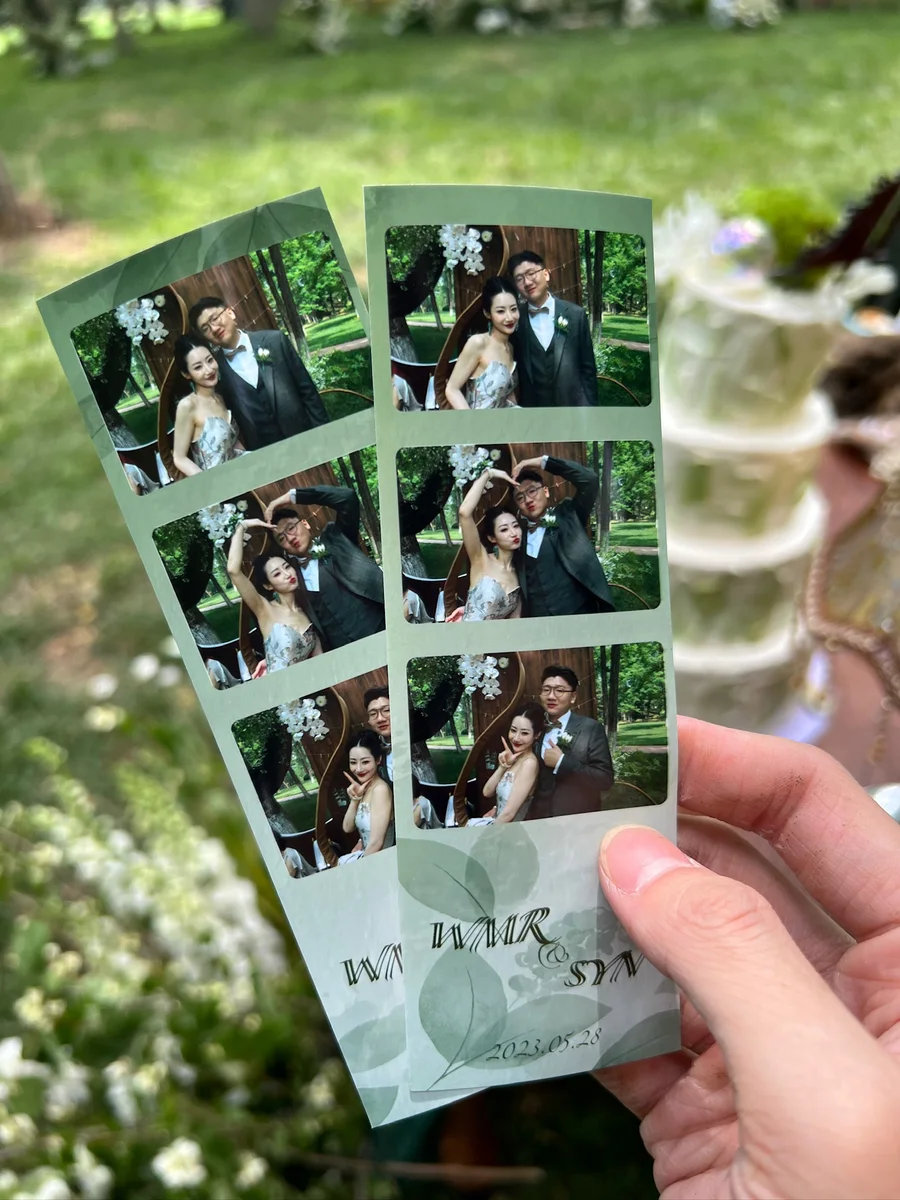
Guests take photos that drop into your own layout, then print them on the spot or scan a QR code for a digital copy.
- Licence
- ¥1,998≈ $280/ terminal
- Payment
- Once, no annual fee
- Hardware
- Not included
How it differs
Why pick it
- Everything a regular session needs: shoot with a Canon camera or a USB webcam, and produce one to four images per session, each built from up to four shots.
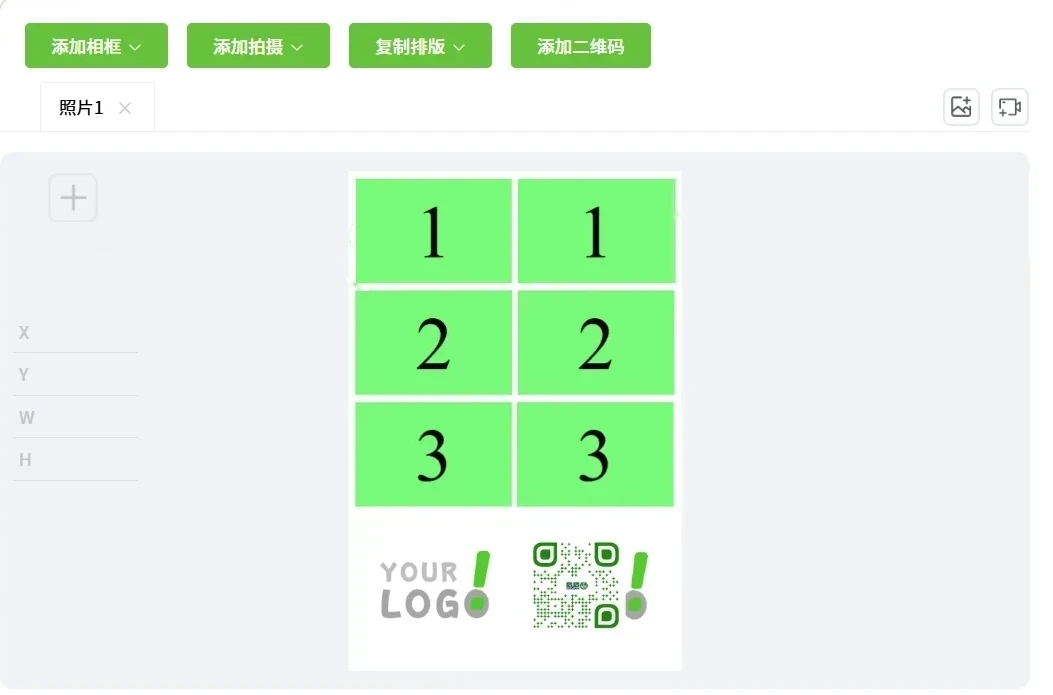
- Layouts and screens in your brand: design your own layouts with a logo and QR code, and swap the buttons, backgrounds and rotating ads.
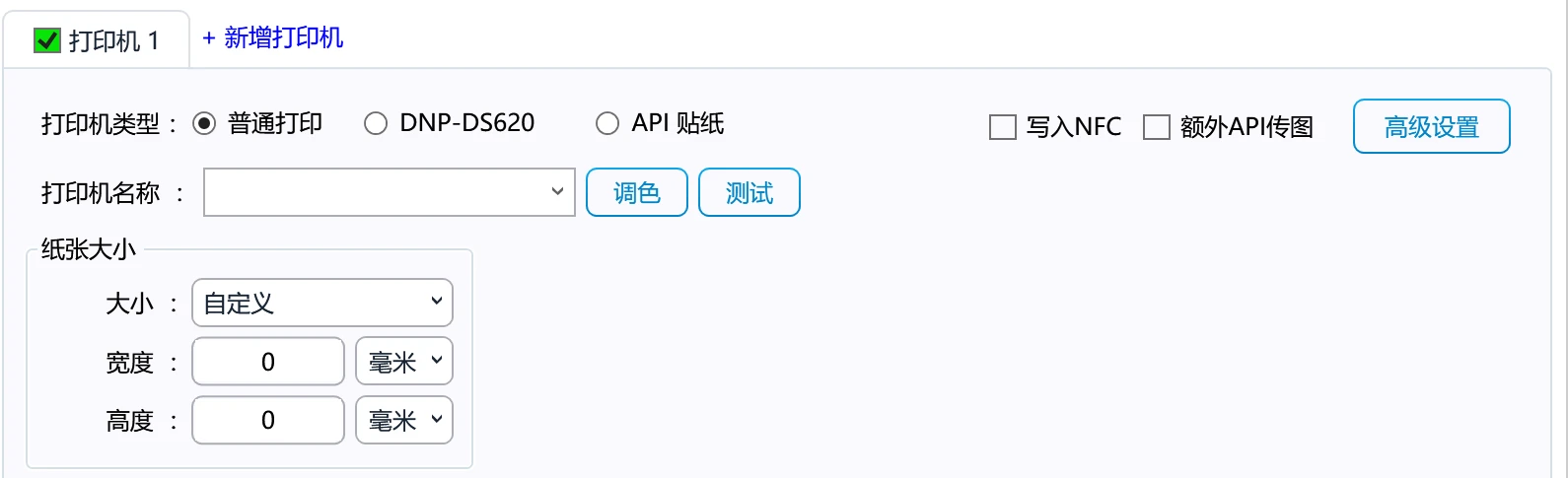
- Print or QR delivery: most printers with a system driver work, guests can scan for a digital copy, and prints can carry a Live Photo that moves.
- Run every unit remotely: shut down, restart and push updates from the PepeFoto console, and copy an existing unit's settings to a new one.
Compared with
- vsPro
Pro includes everything in Standard and adds the AI layer: 1,000+ AI styles, AI video, AR holographic photos, custom style training, later pick-up by subscription and paid sessions. Standard owners can upgrade to Pro for CNY 3,000.
- vsPhoto wall
Standard can show event photos on a big screen. The photo wall is dedicated multi-screen software that adds media from folders or APIs, routing to several screens, timeline animations and 3D scene walls.
- vsAR Mirror Signature
Both use AR, for different jobs. Standard's Live Photo records a short clip during the shot and plays it when the print is scanned. AR Mirror Signature records the signing as native Canon video and adds an intro, outro, frame and music automatically.
Not for, or watch out
- Events that need AI styles: AI-styled photos, AI video, AR holographic photos, later pick-up and paid sessions are all in Pro.
- Lenticular prints, AI cards, mirror signatures or stickers: each has its own standalone edition, and Standard does not include those workflows.
Where it fits
- Weddings, birthday parties and company galas: photo grids and three-shot strips printed on the spot as keepsakes.
- Brand and product promotions: the logo and slogan go into the layout, and the screens take on the brand's look.
- Busy events: several identical printers share one print setup and take turns printing.
- Vintage newspaper prints: photos set in an A4 newspaper design, with a Live Photo that moves when scanned.
- Venues with no room for a green screen: AI cutout places people in a background you design.
How it runs on site
- Licence and bind
With the licence bought, install the software on the booth PC and bind it to the PepeFoto console.
- Design the look
Copy an official layout and screen scheme, swap in the event's logo, backgrounds and ads, and push it to the unit.
- Connect and test
Connect the camera and printer, shoot and print a test, then scan with a phone to check the photo comes through.
- Guests shoot
Guests pick a session on screen, shoot and confirm, and can add stickers and a signature.
- Print or scan
Photos print on the spot or go to phones by QR code; with Live Photo on, scanning the print plays the clip.
- Wrap up
Check that every upload and print has finished, and back up the event photos separately.
What you need
| Software and credits | The Standard software, plus 20,000 credits with the purchase, valid for one year and used by Live Photo AR, AI cutout and AI retouching. | Included |
|---|---|---|
| Computer | Windows 10 or 11 with a 12th-gen Core i5, 8 GB of RAM and a 256 GB SSD or better. | Not included |
| Camera | A Canon EOS camera (with a USB cable and a dummy battery for power) or a driverless USB webcam such as the Logitech 930e. | Not included |
| Printer | Most printers with a system driver work; usually a 4x6 dye-sub printer such as the HiTi 525, DNP 620 or DNP RX1. | Not included |
| Screen | A screen for guests, touch or with external buttons, in portrait or landscape; showing photos on a big screen needs one more display. | Not included |
| Network | The unit must be online for binding, pushed updates, photo uploads and QR delivery. | Not included |
| Media | Photo paper and ribbons are bought separately; newspaper layouts use A4 paper. | Not included |
| Cloud album | QR delivery needs the cloud album service, CNY 999 a year with 10 GB of storage, which is not part of the licence. | Not included |
What guests get
Prints
Single or multi-frame photos at 4x6, 6x8, A4 or a custom size; a DNP DS620A can also cut 2x6 strips.
Digital copy
A scan opens a result page headed by the organiser's logo, to share by link or save with a long press; the QR code can also go on the print.
Live Photo
A short clip is recorded with the photo and plays when the print is scanned in WeChat or Alipay.
Cutout photos
No green screen: people are cut out and placed between a background and foreground you design.
On the big screen
Photos from the event can go up on a big screen for everyone to see.
Costs
| Software licence | ¥1,998≈ $280 | Per terminal, perpetual, no annual fee; hardware excluded. |
|---|
- The purchase includes 20,000 credits, valid for one year and not renewed each year; Live Photo AR, AI cutout and AI retouching are charged per use, and you top up when they run out. The big-screen display uses credits too: one charge each time it is switched on for an event, at the price shown in the console.
- The cloud album service is CNY 999 a year with 10 GB, renewed from its activation date; without it the software still works, but the cloud album does not.
- To add AI styles and AI video later, Standard can be upgraded to Pro at the CNY 3,000 upgrade price, with no need to buy a full licence again.
Credits it uses
Charged per use; the credits page is the reference. 1,000 credits = CNY 10.
| AI Cutout | 100 | Automatically lifts the subject off the background. |
|---|---|---|
| AR Display | 100 | AR display for Live Photos, AI video and recorded video. Only the generation is billed. |
| AI Retouch | 80 | Skin brightening, smoothing, face slimming and liquify. Works on groups and individuals. |
Every feature
- Capture with Canon cameras and USB webcams.
- Set preview and capture camera parameters independently.
- Fully customisable photo layouts.
- Generate up to four output images in one session.
- Use up to four captures in each output image.
- Support 4×6, 6×8, 6×12, 6-inch and A4 photo layouts.
- Create layouts at custom sizes.
- Customise stickers, signature colours and frames on the editing screen.
- Display work on a live photo wall.
- Let guests scan a QR code to access their cloud album.
- Print through printers with a compatible system driver.
- Create Live Photos with AR playback.
- AI retouching: reshape, slim faces, brighten and smooth skin.
- Remove backgrounds with AI, without a green screen.
- Upload photos from a phone.
- Manage devices remotely.
- Fully customise the user interface.