
 Products
All software and pricesPepeFoto photo software
Pro
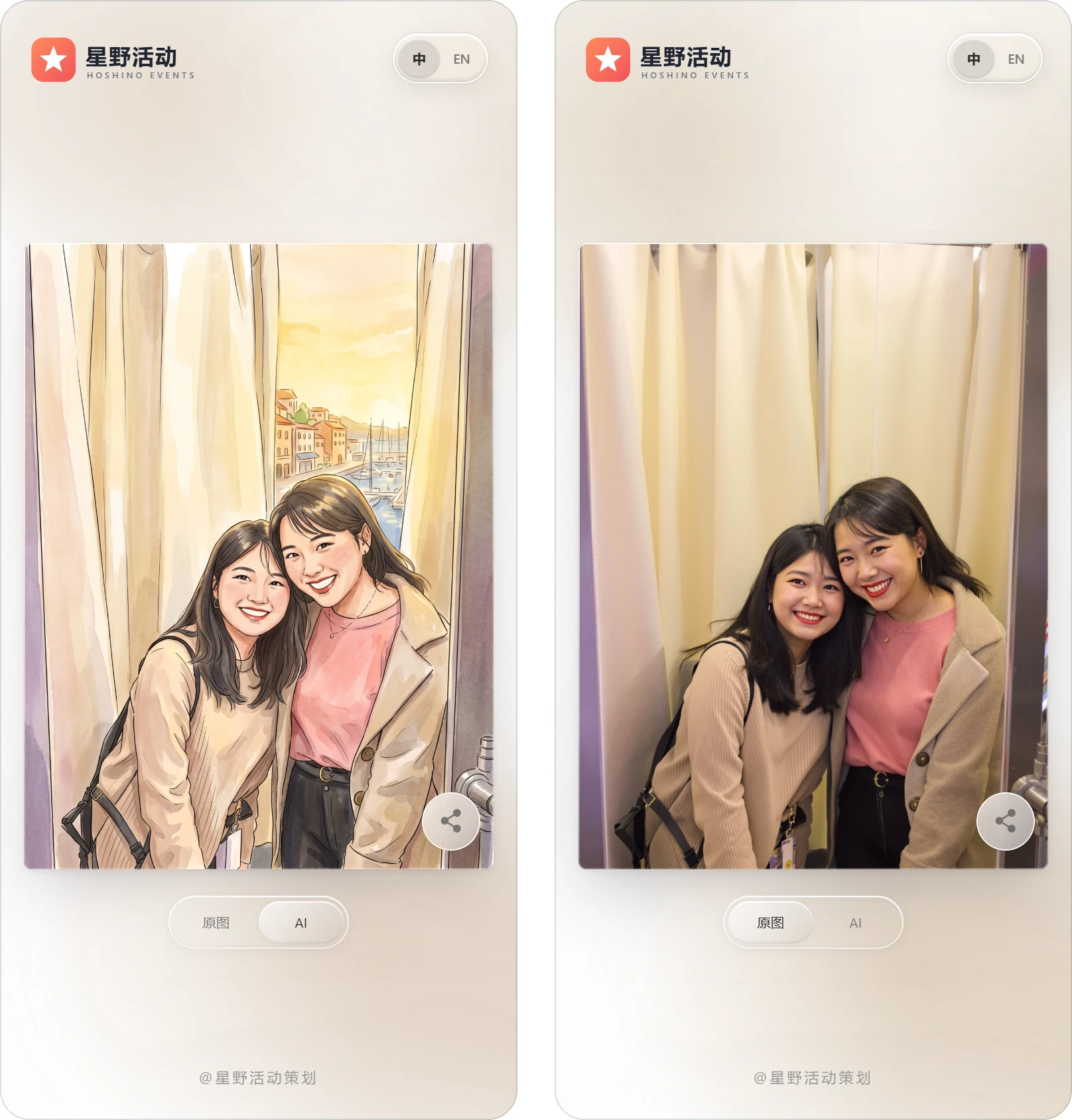
Guests' photos become AI-styled images and AI videos on site, to print or take home by QR code.
- Licence
- ¥5,999≈ $840/ terminal
- Payment
- Once, no annual fee
- Hardware
- Not included
How it differs
Why pick it
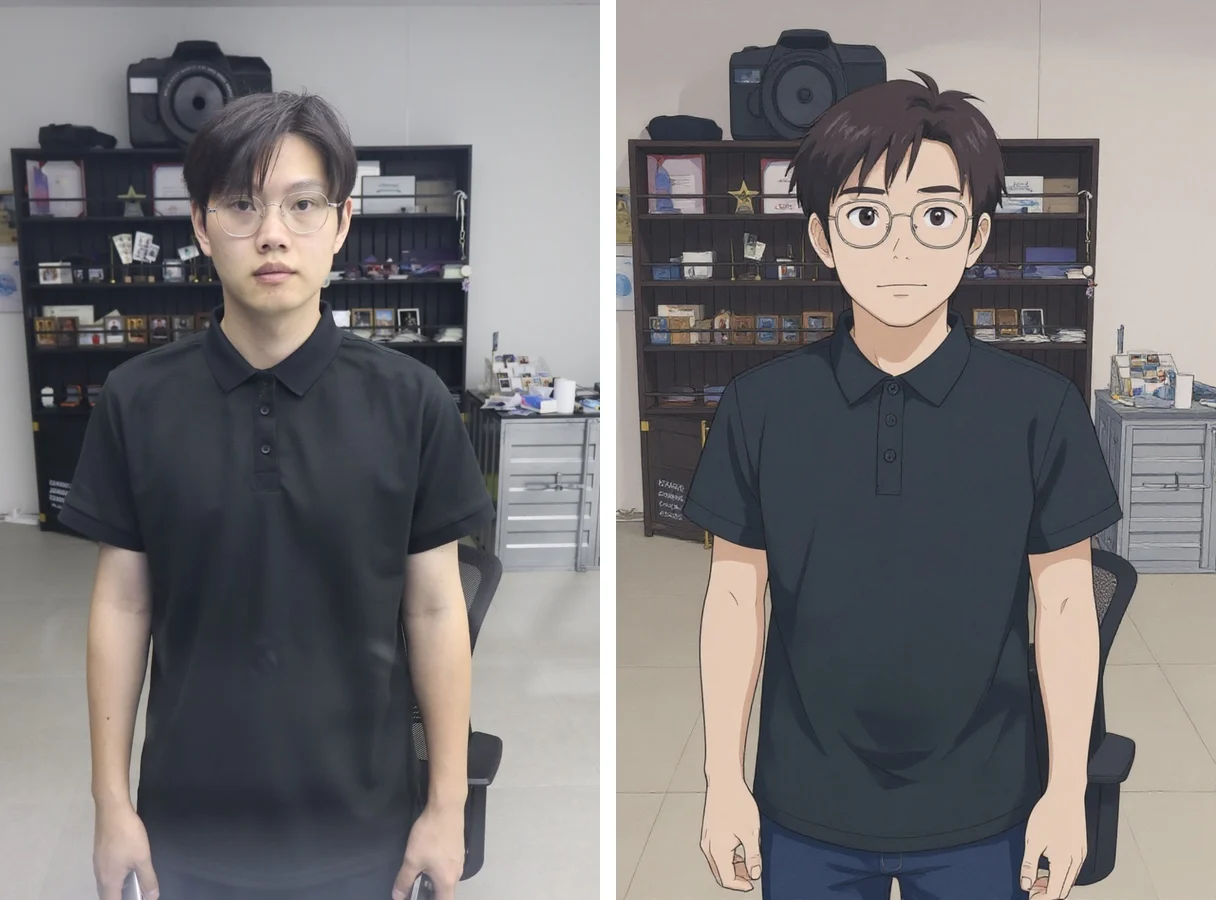
- A big style library, plus your own: over 1,000 AI styles, from photoreal and restyled looks to outfit-change and selfie effects, and you can train a custom style.
- One photo, several results: an AI photo can become an AI video that plays when the print is scanned, and effects can be stacked.
- Slow AI video, no queue: in subscription mode guests scan to subscribe and move on, then collect when a WeChat or SMS notice arrives.
- Paid sessions: take payments through Lakala, set a price per copy plus free prints and free regenerations, and see revenue in the console.
Compared with
- vsStandard
Standard covers capture, layouts, printing and QR delivery. Pro has all of that plus 1,000+ AI styles, AI video, AR holographic photos, custom style training, later pick-up by subscription and paid sessions. Standard owners can upgrade for CNY 3,000.
- vsHolographic booth
Both mention holograms, but they are different things. Pro's AR holographic photos come with 20+ AR templates; the holographic booth software is a separate product that runs the booth itself, from character choice and capture to AI generation and delivery, and Pro does not include it.
- vsAI Stickers
AI Stickers turns photos into white-outlined transparent stickers and prints and cuts them on the PepeFoto sticker machine or compatible equipment, which Pro does not do. In turn, AI Stickers has no AI video, AR holographic photos, style training or later pick-up.
Not for, or watch out
- Events with no AI, just photos and prints: Standard does the job at a lower licence price.
- AI takes time and credits: most styles take 30 to 40 seconds a photo, AI video takes a few minutes, and every generation uses credits.
- Lenticular prints, AI cards, mirror signatures or stickers: each has its own standalone edition, and Pro does not include those workflows.
Where it fits
- Brand pop-ups and launches: guests become on-brand AI characters, with dedicated models quoted per project.
- Events that want photos shared afterwards: the AI photo becomes an AI video that plays when the print is scanned.
- Pop-out newspaper prints: a breakout portrait with an AI style, set in a newspaper layout.
- Paid photo spots: charge per copy, with set numbers of free prints and free AI regenerations.
- Long queues or long AI video waits: guests scan to subscribe and leave, and are told when to collect.
How it runs on site
- Set up Standard first
Install and test the camera, printing and QR delivery as for Standard; the Pro features sit in the same software.
- Pick and test styles
Pick styles in the PepeFoto console and try each on a sample photo to see the result, time and credits before using it.
- Add to the layout
Add the styles to your layout; when one style goes into several frames, you can set it to generate just once and save credits.
- Set up payments
To charge on site, complete merchant verification, then set the price per copy and the free allowances.
- Shoot and generate
Guests pick a style and shoot, the photo goes to AI automatically, and the result is printed or collected by QR code.
- Collect later
AI video takes a few minutes, so guests can scan to subscribe and leave, then collect when notified.
- Check usage and revenue
Check each unit's AI log, credit use and revenue in the console, and follow up paid orders that did not finish.
What you need
| Software and credits | The Pro software, plus 20,000 credits with the purchase, valid for one year and spent on AI photos, AI video and AR. | Included |
|---|---|---|
| Computer and camera | As for Standard: a Windows 10 or 11 PC and a Canon EOS camera or USB webcam. | Not included |
| Printer | Most printers with a system driver work, usually a 4x6 dye-sub; QR-only events can skip it. | Not included |
| Network | AI runs on the platform, so the unit must be online; speed depends on the network and photo resolution. | Not included |
| Merchant account | Charging on site needs a business licence, and the legal representative verifies the merchant account in WeChat Pay and Alipay under their own name. | Not included |
| Cloud album | QR delivery needs the cloud album service, CNY 999 a year with 10 GB of storage, which is not part of the licence. | Not included |
| Guests' phones | AR is viewed by scanning in WeChat or Alipay; the Huawei, Redmi, OPPO and Samsung phones in our tests could not do it in a browser. | Not included |
What guests get
AI-styled photos
Printed or collected by QR code; the result page switches between the original and the AI version, and either can be saved with a long press.
AI video
A clip of the original turning into the AI image, collected by QR code or played by scanning the print.
AR photos
Live Photos and AI videos play when the print is scanned, and AR holographic photos come with 20+ templates.
Later pick-up
Guests leave, get a WeChat or SMS notice when the result is ready, and collect it then.
Everything in Standard
Prints, digital copies, Live Photos, cutout photos and the big-screen display are all included.
Costs
| Software licence | ¥5,999≈ $840 | Per terminal, perpetual, no annual fee; hardware excluded. |
|---|
- The purchase includes 20,000 credits, valid for one year and not renewed each year; each AI style costs a different amount, and higher-resolution photos cost more. SMS notices in subscription mode may use extra credits; check before ordering.
- Custom style training is charged per run, as set out on the credits page; brand models we train for you are quoted per project.
- The cloud album service (CNY 999 a year with 10 GB) is extra; Standard owners can upgrade to Pro at the CNY 3,000 upgrade price.
Credits it uses
Charged per use; the credits page is the reference. 1,000 credits = CNY 10.
| Standard AI | 100–200 | General image restyling — comic, cyberpunk and similar. Handles group shots. |
|---|---|---|
| Workflow AI | 200 | ComfyUI-based pipelines, mostly for client-specific custom effects. |
| Portrait AI | 200 | Portrait-grade processing for a single subject; 2:3 vertical only. |
| AI Cutout | 100 | Automatically lifts the subject off the background. |
| AI Video 1–2 | 600–1500 | Generates video from the original photo combined with the AI-generated image. |
| AR Display | 100 | AR display for Live Photos, AI video and recorded video. Only the generation is billed. |
Every feature
- Includes every Standard feature.
- AI photos with over 1,000 styles.
- Photoreal, restyled, outfit-change and selfie effects, over a thousand in all.
- Combine multiple effects in a workflow.
- AR holographic photos with over 20 templates.
- Reposition and resize people after AI background removal.
- AI video transitions from the original photo to an AI image.
- Train a custom AI style.
- Submit generation tasks for later delivery.
- Paid photo modes through the Lakala interface.