

360 一体机软件360 video software
相机拍完的 360 视频自动加工、上传,在大屏播放,嘉宾扫码领走自己那条。Clips from the 360 booth are processed and uploaded automatically, play on the big screen, and each guest scans to collect their own.
- 软件授权Licence
- ¥5,999≈ $840/ 终端/ terminal
- 收费方式Payment
- 一次买断,不收年费Once, no annual fee
- 硬件Hardware
- 不含,自备或另行报价Not included
和谁不一样How it differs
选它的理由Why pick it
- 素材自动进队列:相机文件一到电脑,就按本场流程加工,急的能插队。Clips queue themselves: each camera file is processed with the event's flow as soon as it reaches the PC, and urgent ones can jump the queue.
- 成片可调可审:可套达芬奇调色模板、开防抖,存储或上传前能加人工审核。Grade and approve: apply a DaVinci Resolve grading template, turn on stabilisation, and add manual review before storage or upload.
- 大屏和二维码一起出:每条视频配自己的二维码,嘉宾扫到的就是自己那条。Screen and QR code together: every clip has its own QR code, so each guest scans their own.
- AI 视频自动回到现场:嘉宾在手机上选风格发起,生成后软件自动下载,在监控台管理哪些上屏。AI video comes back by itself: the guest picks a style on their phone, the software downloads the result, and the monitor decides which clips go on screen.
和相近软件比Compared with
- 对比vsAR 镜面签AR Mirror Signature
AR 镜面签是拍照软件的独立功能版,用佳能相机录签名视频,自动加片头片尾,再做 AR 展示。这款多的是相机素材自动进队列、调色审核、按分发模板排大屏和 AI 视频同步。AR Mirror Signature is a standalone edition of the photo software: it records signing videos on a Canon camera, adds the intro and outro automatically and plays them back in AR. This software adds automatic intake from the cameras, grading and review, display templates for the big screen, and AI video sync.
- 对比vs专业版Pro
专业版的 AI 视频在拍照流程里生成,从原图变成 AI 图。这款的 AI 视频由嘉宾扫自己视频的二维码发起,生成后回到大屏。拍照出 AI 图选专业版,拍 360 视频选这款。Pro makes AI video inside the photo workflow, moving from the original photo to the AI image. Here, the guest starts an AI video from their own clip's QR code and it comes back to the big screen. Choose Pro for AI photos and this software for 360 video.
- 对比vs大屏幕照片墙Photo wall
大屏幕照片墙把照片和视频分到多块屏,按时间轴放翻牌墙、照片球等动画。这款多的是每条视频配自己的二维码、调色审核的加工流程和 AI 视频同步。The photo wall routes photos and videos to several screens and animates them on a timeline with flip walls and photo spheres. This software adds a QR code for every clip, a processing flow with grading and review, and AI video sync.
不适合或要注意Not for, or watch out
- 网络不稳的场地:平台绑定、上传、扫码和 AI 视频同步都要联网。Venues with unreliable internet: registration, uploads, QR collection and AI video sync all need a connection.
- 只用云端 FTP 又要 AI 视频:帮助站教程写 AI 视频同步要选 PepeFoto 后台上传,只用 FTP 的话下单前确认。FTP-only setups that also want AI video: the guide says AI video sync needs uploads to the PepeFoto console, so check with us first if you only use FTP.
- 要边拍边改设置:运行中的活动不能直接改,要先停下再改。Changing settings mid-shoot: a running event cannot be edited until it is stopped.
适合的工作和场合Where it fits
- 活动现场的 360 视频互动:成片在大屏播放,嘉宾扫码在手机上看和下载。360 video at events: finished clips play on the big screen, and guests scan to watch and download them on their phone.
- 大屏要配活动视觉的项目:模板里的文字和背景按活动视觉配。Projects where the screen must match the event look: the template's text and backgrounds follow the event design.
- 对色调有要求的项目:加工时套用达芬奇调色模板。Projects with a set colour look: clips are graded with a DaVinci Resolve template.
- 要先审后发的活动:存储前、上传前都能加人工审核。Events where clips need sign-off: add manual review before storage or upload.
- 想多送一条 AI 视频的活动:嘉宾在手机上选风格,生成后回到大屏。Events that offer an AI version too: guests pick a style on their phone and the result comes back to the big screen.
现场怎么跑How it runs on site
- 装好并绑定Install and register
装好软件,把设备码交给管理员,在 PepeFoto 后台登记这台电脑。Install the software and give its device code to the administrator, who registers the PC in the PepeFoto console.
- 新建活动Create the event
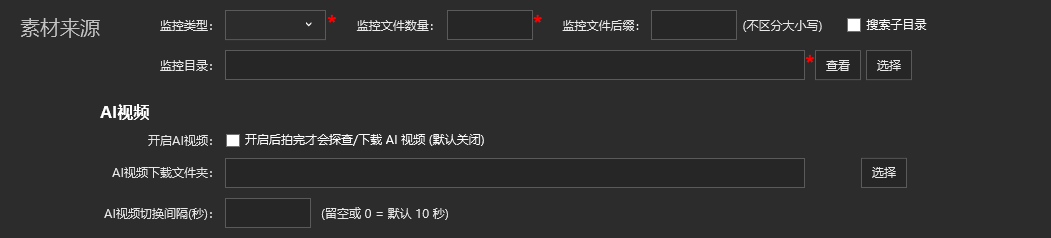
建好本场活动,指定相机文件进来的文件夹和视频编号规则。Set up the event, choosing the folder camera files arrive in and how clips are numbered.
- 设加工与展示Processing and display
选加工流程(调色、防抖、审核)和大屏模板,按需打开上传和 AI 视频。Choose the processing flow (grading, stabilisation, review) and the screen template, and turn on uploads and AI video as needed.
- 试拍一条Test a clip
录一条测试视频,看画面和声音,再用手机扫一次二维码。Record a test clip, check the picture and sound, then scan its QR code with a phone.
- 正式拍摄Shoot
视频按编号排队加工,急的插队;开了审核要有人及时处理。Clips are processed in number order and urgent ones can jump the queue; if review is on, keep someone on it.
- 上屏与扫码Screen and QR
大屏播放视频和二维码,嘉宾扫码看、下载,也能发起 AI 视频。The big screen plays clips with their QR codes; guests scan to watch and download, and can start an AI video.
- 收场备份Close and back up
加工、上传完成后停止活动并备份;还要收 AI 视频就先别停。When processing and uploads are done, stop the event and back up; keep it running if AI videos are still due.

要准备什么What you need
| 软件Software | 360 一体机软件安装包,由交付人员提供。The 360 software installer, supplied by our delivery team. | 含在授权里Included |
|---|---|---|
| 360 一体机360 rig | 由你准备,型号和数量在报价时确认。You supply the rig; model and quantity are confirmed in the quote. | 不含在授权里Not included |
| 相机Cameras | 由你准备,型号在报价时确认;拍完的文件要能传回电脑。You supply the cameras; models are confirmed in the quote, and their files must reach the PC. | 不含在授权里Not included |
| 电脑PC | 由你准备,配置在报价时确认,留足存放视频的硬盘空间。You supply the PC; its spec is confirmed in the quote. Leave plenty of disk space for video. | 不含在授权里Not included |
| 大屏Display | 由你准备,播放视频和二维码;尺寸和型号在报价时确认。You supply the display for clips and QR codes; size and model are confirmed in the quote. | 不含在授权里Not included |
| 达芬奇DaVinci Resolve | 要调色时才用:现场打开 DaVinci Resolve 和对应的模板工程。Only for graded events: open DaVinci Resolve and the matching template project on site. | 不含在授权里Not included |
| 网络Internet | 平台绑定、上传、扫码和 AI 视频同步都要联网。Registration, uploads, QR collection and AI video sync all need internet. | 不含在授权里Not included |
嘉宾拿到什么What guests get
普通视频Regular clip
按本场流程加工的 360 视频,在大屏播放,配自己的二维码,扫码就能看、下载。The processed 360 clip plays on the big screen with its own QR code; scan it to watch and download.
AI 视频AI video
嘉宾在手机上选风格发起,生成后带着自己的二维码回到大屏。The guest picks a style on their phone, and the finished AI video returns to the big screen with its own QR code.
商家这边:本地备份On your side: local copies
开了本地存储,成品另存一份在电脑上,收场时一起备份。With local storage on, each finished clip is also saved on the PC, ready to back up at close.
费用Costs
| 软件授权Software licence | ¥5,999≈ $840 | 每终端,一次买断,不收年费;不含硬件。Per terminal, perpetual, no annual fee; hardware excluded. |
|---|
- 360 一体机、相机、电脑和大屏都由你准备,不在授权里;适用设备数量与配套服务以报价约定为准。The 360 rig, cameras, PC and display are yours to supply and not included; the device allowance and services follow the quote.
- AI 视频由嘉宾在手机上发起、平台生成,费用以报价约定为准。AI videos are started by guests and generated by the platform; their cost follows the quote.
积分表里没有这款的扣费项。No item in the credits table applies to this product.
AI 视频扣不扣积分、扣哪一项,资料里还没定论,下单前和我们确认。Whether AI video uses credits, and which item, is not settled in our documents yet; check with us before ordering.
完整功能Every feature
- 活动创建与素材目录监控Create activities and monitor media folders
- 相机与设备控制流程配置Configure camera and device control workflows
- 视频加工进度、模板与上传管理Manage processing progress, templates and uploads
- 普通视频、AI 视频与对应二维码展示Display regular videos, AI videos and their QR codes
- 绑定 PepeFoto 平台,上传到 PepeFoto 后台或云端 FTPBind to the PepeFoto platform and upload to the PepeFoto console or cloud FTP
- 人工审核后再保存或上传Manual review before saving or uploading
- AI 视频上架、下架与锁定Put AI videos on or off screen, or lock them