

软件与价格All software and pricesPepeFoto 拍照软件PepeFoto photo software
AR 镜面签AR Mirror Signature
嘉宾在镜面上签名,镜后的相机录下笔迹和神情,视频绑在打印照片上,手机一扫就播。Guests sign on a mirror while a camera behind it films the ink and their expression; the clip is tied to their print and plays when a phone scans it.
- 软件授权Licence
- ¥5,999≈ $840/ 终端/ terminal
- 收费方式Payment
- 一次买断,不收年费Once, no annual fee
- 硬件Hardware
- 不含,自备或另行报价Not included

和谁不一样How it differs
选它的理由Why pick it
- 相机原生录制:签名过程用佳能相机直接录,笔迹边缘和人物细节按相机的录制规格保留。Recorded in-camera: a Canon camera films the signing natively, so ink edges and facial detail keep the camera's own quality.
- 录完自动成片:按模板加片头、片尾、相框和音乐,现场不用另外剪辑。Finished automatically: each clip gets the template's intro, outro, frame and music, with no editing on site.
- 视频绑在照片上:打印照片带 AR 码,嘉宾用微信或支付宝一扫,签名视频就在照片上播放。The clip lives on the print: the photo carries an AR code, and scanning it in WeChat or Alipay plays the signature clip on the photo.
- 镜头签整机已含本版:要整套设备选镜头签 LenSign;自己配设备的,可以只买软件。Included with LenSign: choose the LenSign unit for a complete setup, or buy just the software if you are putting your own kit together.
和相近软件比Compared with
- 对比vs标准版Standard
标准版的 Live 照片也能扫照片看动态,但那是拍照时自动录的一小段。AR 镜面签多了相机原生录制、可设录制时长和片头片尾模板;标准版多的是 AI 抠像和手机上传。Standard's Live Photo also plays motion when the print is scanned, but it is a short clip captured automatically with the photo. AR Mirror Signature adds native camera recording, a set clip length and intro and outro templates; Standard adds AI background removal and phone upload.
- 对比vs专业版Pro
专业版多的是 AR 全息照片、AI 视频和 AI 自训练,两款都能做 AI 照片;AR 镜面签多的是相机原生录制、录制时长和视频模板。要 AI 花样选专业版,要签名视频选 AR 镜面签。Pro adds holographic AR photos, AI video and custom style training, and both include AI photos; AR Mirror Signature adds native camera recording, a set clip length and video templates. Choose Pro for AI effects and AR Mirror Signature for signature clips.
- 对比vs大屏幕照片墙Photo wall
大屏幕照片墙把照片和视频分到大屏、电视和网页上按时间轴轮播,自己不录视频;AR 镜面签负责录签名、做 AR。要多块屏、按时间轴编排签名视频,再配照片墙,它能从活动相册同步视频。The photo wall spreads photos and videos across big screens, TVs and web pages on a timeline but records nothing itself; AR Mirror Signature records the signing and builds the AR. For signature clips across several screens on a timeline, add the photo wall, which can sync videos from the event album.
不适合或要注意Not for, or watch out
- 相机要先确认:部分佳能机身(如 200D II)不能原生录制签名视频,下单前把型号发给我们确认。Check your camera first: some Canon bodies, such as the 200D II, cannot record the signature natively, so send us your model to confirm before ordering.
- 开放、逆光、没法遮光的场地:镜面容易反光,亮背景会淹没笔迹,要围出封闭空间。Open or backlit venues you cannot shade: the mirror picks up reflections and bright backgrounds wash out the ink, so the booth needs to be enclosed.
适合的工作和场合Where it fits
- 活动签到:嘉宾到场先在镜面上签名,当场拿到带 AR 码的照片。Event check-in: guests sign on the mirror as they arrive and leave with a print carrying an AR code.
- 品牌发布会、企业年会、客户答谢会,给每位嘉宾留一段签名影像。Product launches, corporate galas and client appreciation events, where every guest gets a clip of their own signing.
- 高端婚礼、大型展览、音乐节和体育赛事的签名留念。Signing keepsakes at high-end weddings, major exhibitions, music festivals and sporting events.
- 展馆里的签名位:围出封闭遮光的空间,避开灯光和亮背景造成的逆光。Signing booths inside exhibition halls, set up as an enclosed, shaded space away from hall lights and bright backgrounds.
现场怎么跑How it runs on site
- 建相册和排版Set up the event
在 PepeFoto 后台建活动相册、打开 AR,做好带 AR 码的签名照片排版。In the PepeFoto console, create the event album, switch on AR and lay out the signature print with its AR code.
- 装相机和补光Camera and lights
相机装在镜面后方,正面加补光照亮笔迹和脸,相机参数按教程调好。Mount the camera behind the mirror, add front lights for the ink and the face, and set the camera up as the guide describes.
- 设录制时长Set the clip length
在拍照软件里设好每段录多久,建议 8–10 秒;要现场声音就打开录音。In the booth software, set how long each clip runs (8–10 seconds is recommended) and turn on audio if you want room sound.
- 开场前验收Test before doors open
请同事站到嘉宾位置完整签一次,看相机实际录下的视频,笔迹和脸都清楚再开场。Have a colleague sign in full from the guest's spot and check the camera's actual recording; open only when the ink and the face are both sharp.
- 嘉宾签名出片Guests sign
嘉宾在镜面上签名,相机录下签名和神情;软件套好模板,打印带 AR 码的照片。The guest signs on the mirror while the camera records; the software applies the template and prints the photo with its AR code.
- 扫码看视频Scan and watch
嘉宾用微信或支付宝扫照片上的码,签名视频在照片上播放,看完能存到手机。Guests scan the code on the print in WeChat or Alipay, the signature clip plays on the photo, and they can save it to their phone.

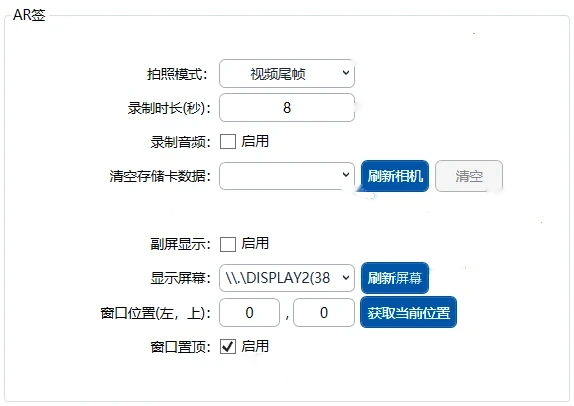
要准备什么What you need
| 软件Software | AR 镜面签版授权:签名录制、视频模板、AR 展示,另含基础拍照和 AI 照片。The AR Mirror Signature licence: signature recording, video templates and AR playback, plus basic capture and AI photos. | 含在授权里Included |
|---|---|---|
| 电脑PC | Windows 10 / 11,第 12 代 i5 以上、8GB 内存、256GB SSD。Windows 10 or 11 with a 12th-gen Core i5 or better, 8 GB RAM and a 256 GB SSD. | 不含在授权里Not included |
| 相机Camera | 佳能 EOS 单反或微单,用 USB 线和假电池供电;部分机身不能原生录制,型号先和我们确认。A Canon EOS DSLR or mirrorless body on a USB cable and dummy battery; some bodies cannot record natively, so confirm your model with us. | 不含在授权里Not included |
| 镜面签机箱Mirror enclosure | 镜面和机箱不在授权里,相机装在镜面后方拍嘉宾;镜头签整机自带。The mirror and enclosure are not part of the licence; the camera sits behind the mirror to film the guest. The LenSign unit comes with one. | 不含在授权里Not included |
| 打印机Printer | 打印带 AR 码的照片;兼容多数 4x6 热升华机,如呈研 525、DNP 620、DNP RX1。Prints the photo with its AR code; most 4x6 dye-sub printers work, such as the HiTi 525, DNP 620 and DNP RX1. | 不含在授权里Not included |
| 补光和遮光Lighting and shade | 正面加补光灯,照亮笔迹也给脸补光;拍摄空间要封闭,挡住身后的强光。Front lights to brighten the ink and fill the face, and an enclosed space that blocks strong light from behind. | 不含在授权里Not included |
| 网络Network | 照片和视频要上传,做成 AR 约 20 秒,嘉宾扫码看也要联网,现场要有稳定网络。Photos and clips upload, the AR takes about 20 seconds to build and guests need a connection to play it, so the venue needs a stable network. | 不含在授权里Not included |
电脑配置、相机与打印机兼容清单PC requirements and the camera and printer list
嘉宾拿到什么What guests get
打印照片A print
当场打印、带 AR 码的照片,横版竖版都行,常用 4x6 英寸。A photo printed on the spot with an AR code, landscape or portrait, usually 4x6 inches.
签名视频A signature clip
签名过程的一段视频,建议 8–10 秒,套好片头、片尾、相框和音乐,可带现场声音。A clip of the signing, 8–10 seconds as recommended, finished with the template's intro, outro, frame and music, with room sound if you want it.
扫码看 ARAR on the print
手机扫照片上的码、对准照片,签名视频就在照片上播放,不用装 App。Scan the code and point the phone at the print, and the clip plays on the photo, with no app to install.
存到手机A copy to keep
看完可以把视频存到手机相册,拿去分享。After watching, guests can save the clip to their camera roll and share it.
费用Costs
| 软件授权Software licence | ¥5,999≈ $840 | 每终端,一次买断,不收年费;不含硬件。Per terminal, perpetual, no annual fee; hardware excluded. |
|---|
- 每段签名视频做成 AR 扣一次 AR 展示(100 分);照片用了 AI 风格的再另扣,以积分说明为准。Each signature clip turned into AR uses one AR display charge (100 credits); photos with an AI style are charged on top, as set out on the credits page.
- 电脑、相机、打印机、镜面签机箱和补光灯都不在授权里;整套配置和配套服务以报价为准。The PC, camera, printer, mirror enclosure and lights are not included; the full setup and services follow the quote.
- 电子相册 ¥999/年,含 10GB,嘉宾扫码看视频、下载都走相册;视频占空间,不够可加扩容包。The cloud album, where guests watch and download their clips, is CNY 999 a year with 10 GB; video fills space quickly, and storage add-ons are available.
会用到的积分项Credits it uses
按次扣分,以「积分说明」页为准;1,000 积分 = ¥10。Charged per use; the credits page is the reference. 1,000 credits = CNY 10.
| AR 展示AR Display | 100 分100 | 支持 Live Photo、AI 视频和录制视频的 AR 展示,仅收取生成费用。AR display for Live Photos, AI video and recorded video. Only the generation is billed. |
|---|---|---|
| 普通 AIStandard AI | 100-200 分100–200 | 用于普通图像转换,如漫画、赛博朋克风格,适合多人场景。General image restyling — comic, cyberpunk and similar. Handles group shots. |
完整功能Every feature
- 视频编辑功能Edit videos.
- AR镜头签视频录制Record AR mirror-signature videos.
- 自动视频编辑功能Automatically edit recorded clips.
- 片头、片尾、相框、音乐等模板Apply templates with intros, outros, frames and music.
- 高清视频录制Record high-definition video.
- 佳能相机原始录制视频Use native Canon camera video recording.
- 自定义时间设置Set the recording duration.
- 设备远程管理Manage devices remotely.
- UI完全自定义Fully customise the user interface.