

PepeFoto 平台 9 月更新:新版结果页、仪表盘最新照片与授权在线续费PepeFoto Platform September 2026 Update: New Result Page, Latest Photos and Online License Renewal
9 月,PepeFoto 平台连续发布了几个版本(v2026.09.08 至 v2026.09.23)。这篇文章把其中最常用到的几项变化整理出来:观众看到的结果页、运营人员看的仪表盘、软件授权的续费,以及顶栏积分和平台更新日志两个小改进。每一项都配了截图,不看视频也能看明白。PepeFoto Platform shipped several releases in September (v2026.09.08 to v2026.09.23). This post walks through the changes you will use most: the result page your guests see, the dashboard your team works from, license renewal, and two smaller improvements — the credit balance in the top bar and the platform changelog. Every section comes with screenshots, so you can follow along without watching the video.
1. 观众扫码打开的结果页,换了全新设计1. A redesigned result page for your guests
活动现场拍完照,观众用手机扫码就能打开自己的结果页。9 月 23 日的版本把这个页面换成了全新的查看器:顶部显示活动方的 Logo,背景颜色会跟着照片的色调变化,底部可以放一行品牌文字。After a guest takes a photo at your event, they scan a QR code to open their own result page. The September 23 release replaces this page with a completely new viewer: your logo sits at the top, the background picks up the colors of the photo, and a line of brand text can appear at the bottom.
观众上传的原图和 AI 成片会同时交给页面。页面打开时会先自动对比一次,之后点照片下方的「原图 / AI」就能来回切换,一眼看出 AI 把照片变成了什么样。The page receives both the guest's original photo and the AI result. When it opens, it plays a quick before-and-after comparison once; after that, the Original / AI switch under the photo lets guests flip between the two and see exactly what the AI changed.
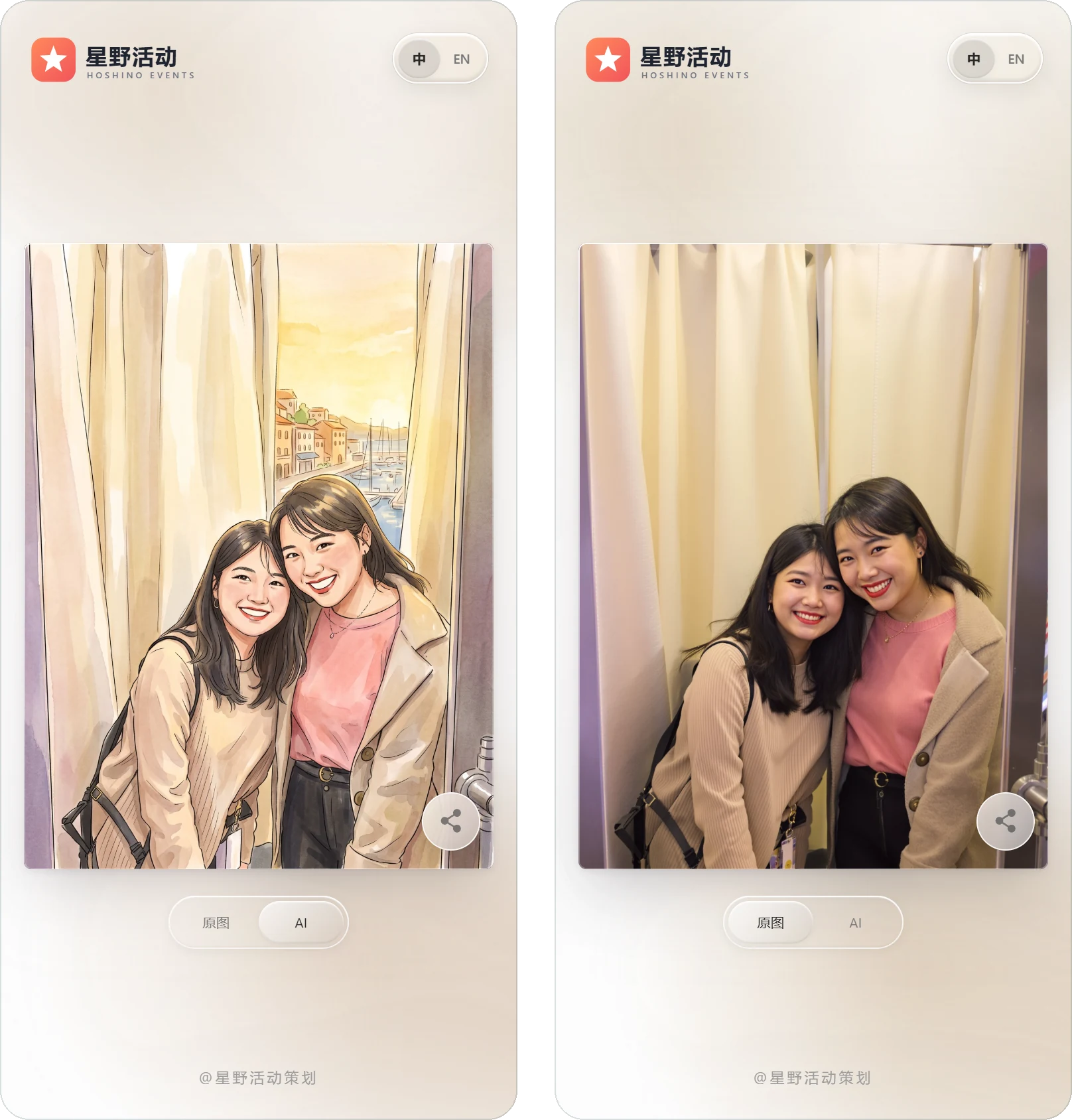
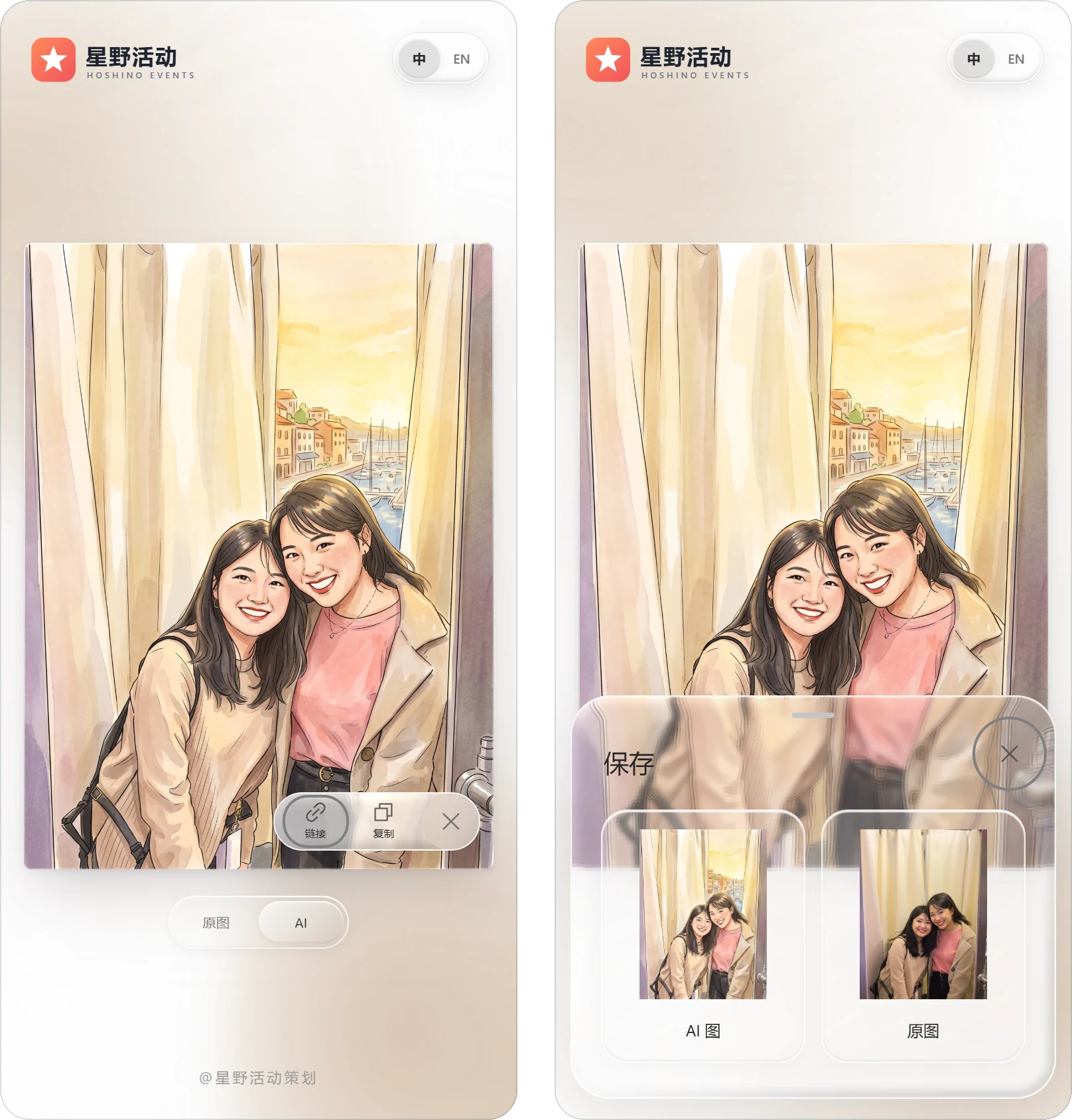
分享和保存也更顺手:点照片右下角的分享按钮,会展开「链接」和「复制」两个选项;长按照片会弹出保存面板,AI 图和原图都可以保存。Sharing and saving are easier too. Tapping the share button at the lower right of the photo reveals Link and Copy options, and pressing and holding the photo opens a save panel where guests can keep the AI image, the original, or both.
2. 仪表盘:每天的数字和最新照片,打开就能看到2. The dashboard: daily numbers and the latest photos at a glance
登录管理后台后,仪表盘汇总了设备、授权和积分的概况,下方依次是趋势图、近期活动和最新照片。When you sign in to the admin console, the dashboard summarizes your devices, licenses and credits, followed by the trend chart, recent events and the latest photos.
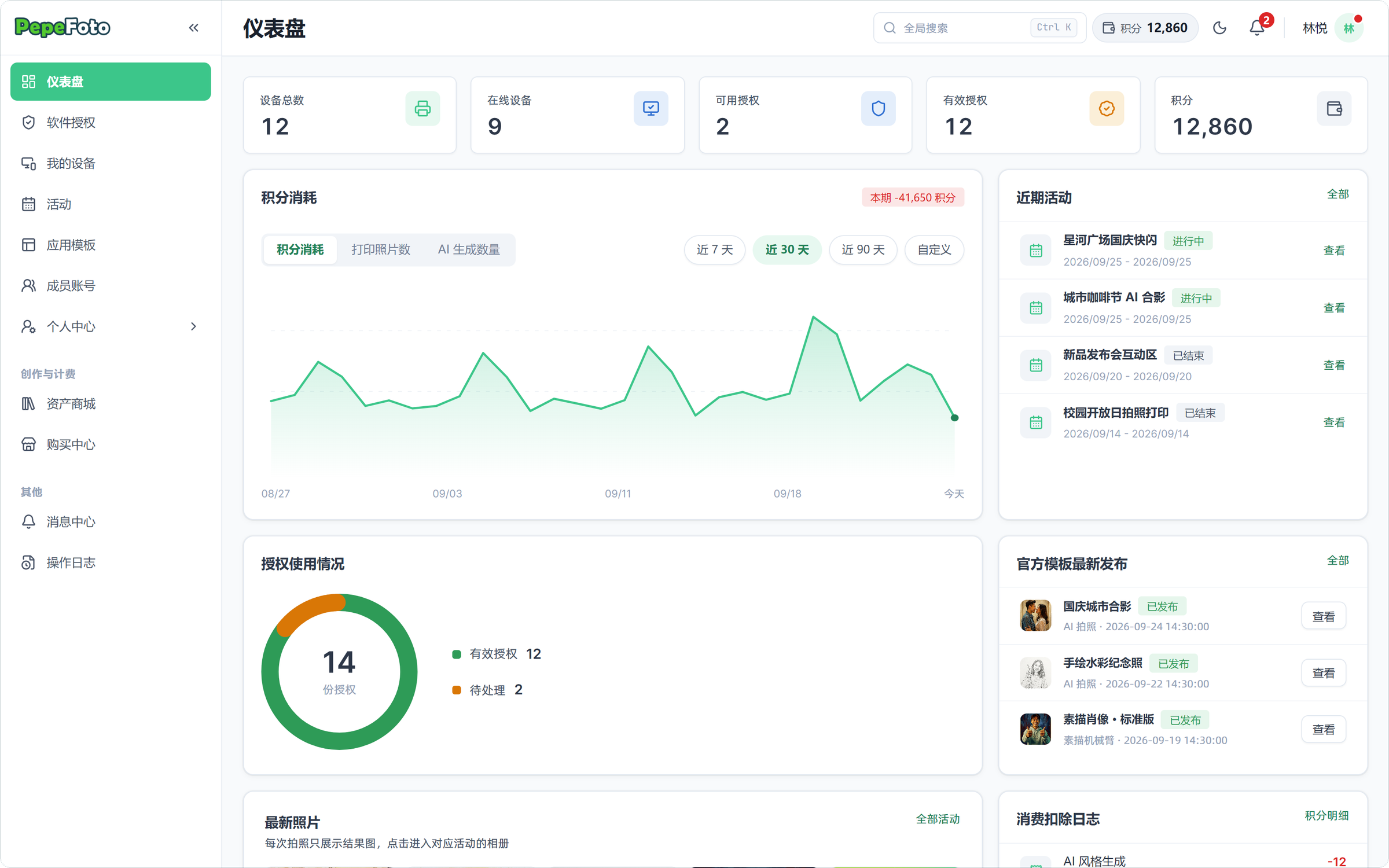
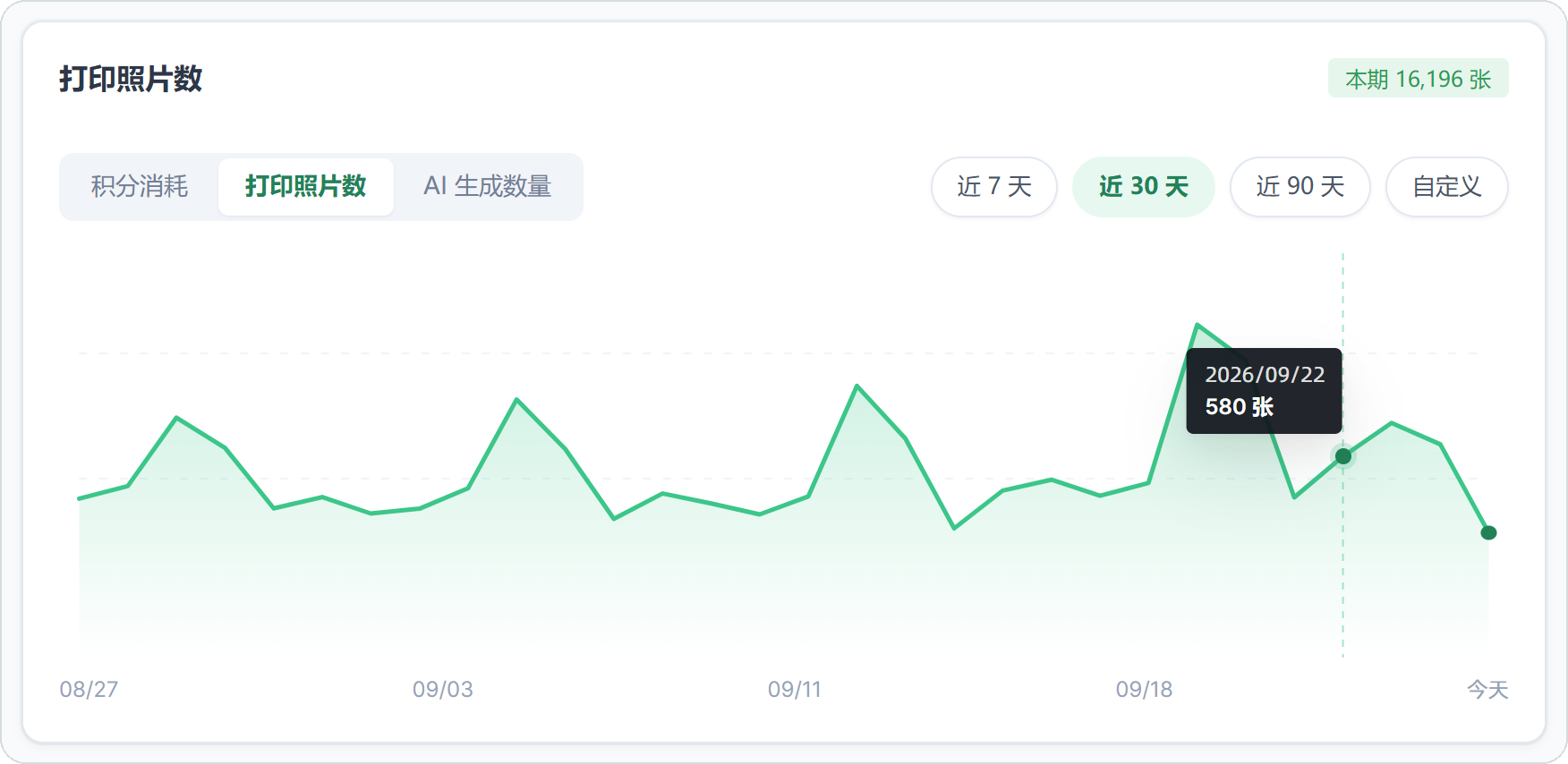
趋势图可以在积分消耗、打印照片数和 AI 生成数量之间切换,时间范围可选近 7 天、30 天、90 天或自定义。这次新增了悬停提示:把鼠标移到折线上,直接显示当天的日期和数值,不用再对着坐标轴估算。The trend chart switches between credit usage, printed photos and AI generations, over the last 7, 30 or 90 days or a custom range. New this month: hover over the line and the chart shows that day's date and exact value, so there is no more guessing from the axis.
「最新照片」卡片按时间列出最近的 16 张照片。同一次拍摄只显示最终的结果图,不会出现原图和成片各占一格;每张照片上标出活动名称、拍摄设备和时间,点一下就进入对应活动的相册。The Latest photos card lists your 16 most recent photos. Each capture shows only its final result, so an original and its AI version never take up two slots, and every tile shows the event name, the device that took it and when. Click a tile to jump to that event's album.

3. 软件授权:快到期时,在列表里直接续费3. Software licenses: renew right from the list
「软件授权」页按应用分组列出每一张授权,有效期一栏直接显示剩余天数:30 天内到期变成橙色提醒,7 天内到期和已过期变成红色。The Software licenses page groups every license by application, and the validity column shows the days remaining. Licenses expiring within 30 days turn orange; those within 7 days, or already expired, turn red.
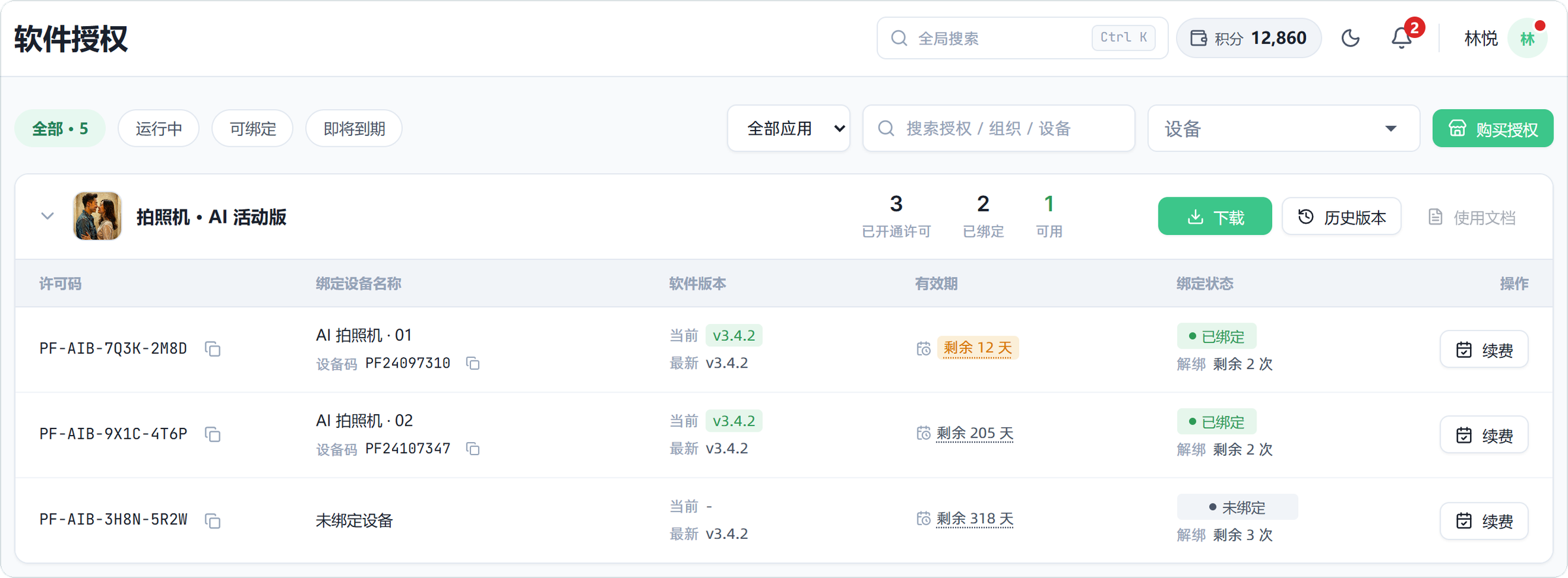
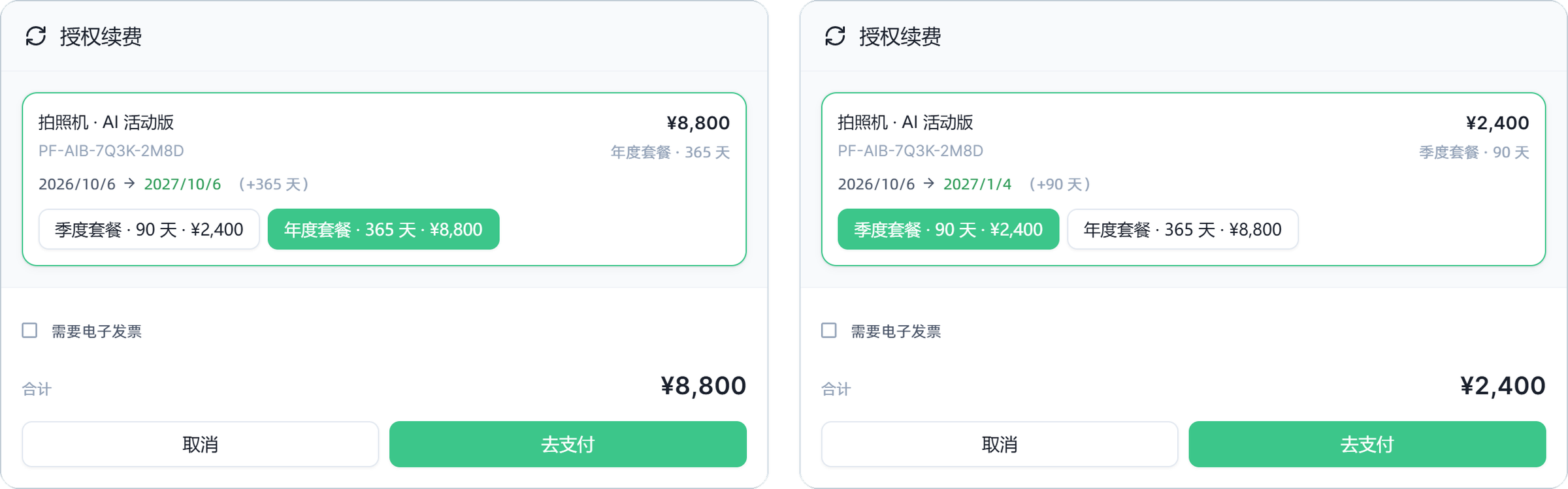
点这一行的「续费」,会打开只包含这张授权的续费对话框。选择套餐后,金额和续费后的到期日会立即更新,确认后点「去支付」在线下单。续费从原到期日开始计算;授权已经过期的,从续费当天开始计算。所属应用已在商城上架的授权都可以自助续费;没有上架的,按钮会置灰并提示联系平台。Click Renew on that row to open a renewal dialog for just that license. Pick a plan and the price and new expiry date update instantly; then choose Pay to place the order online. Renewal time is added from the current expiry date, or from the day you renew if the license has already expired. Any license whose application is listed in the store can be renewed on your own; if it is not listed, the button is grayed out and asks you to contact the platform team.
说明:官网在售的 PepeFoto 拍照软件授权都是一次买断,不会到期;这里的有效期与续费,针对的是按期开通的授权与服务。截图里的套餐和价格是演示数据,实际以购买中心显示为准。Note: the PepeFoto photo booth software licences sold on this site are one-time purchases and do not expire; the validity periods and renewals shown here apply to licences and services opened for a fixed term. Plans and prices in the screenshots are demo data; the purchase center shows the actual options.
4. 顶栏随时看到积分余额4. Your credit balance, always in the top bar
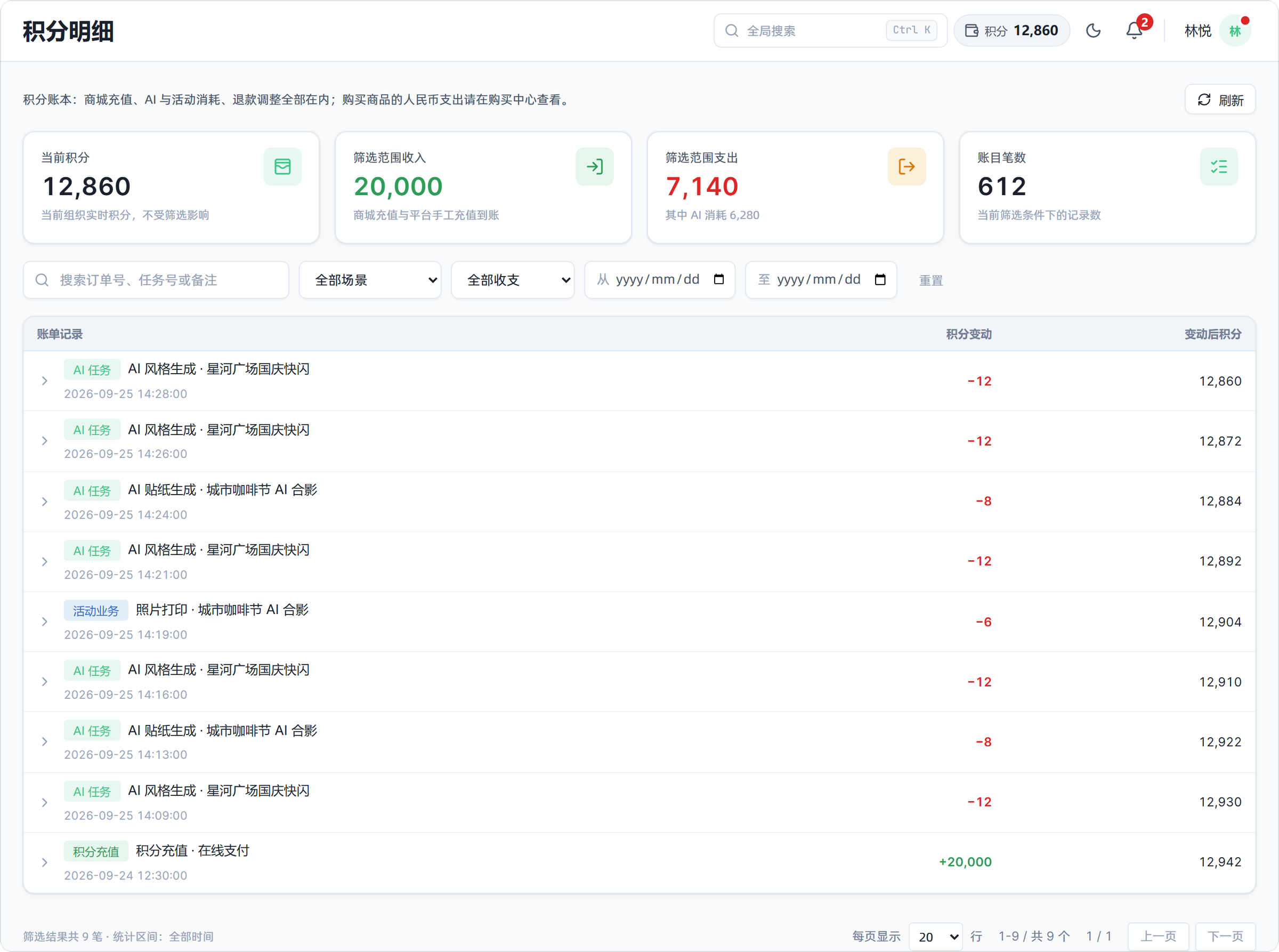
组织的积分余额常驻在管理后台顶栏(组织管理员和财务角色可见),点一下就进入积分明细,能看到每一笔 AI 生成、打印消耗和充值记录。Your organization's credit balance now stays in the top bar of the admin console (visible to organization admins and finance roles). Click it to open the credit ledger, which lists every AI generation, print charge and top-up.

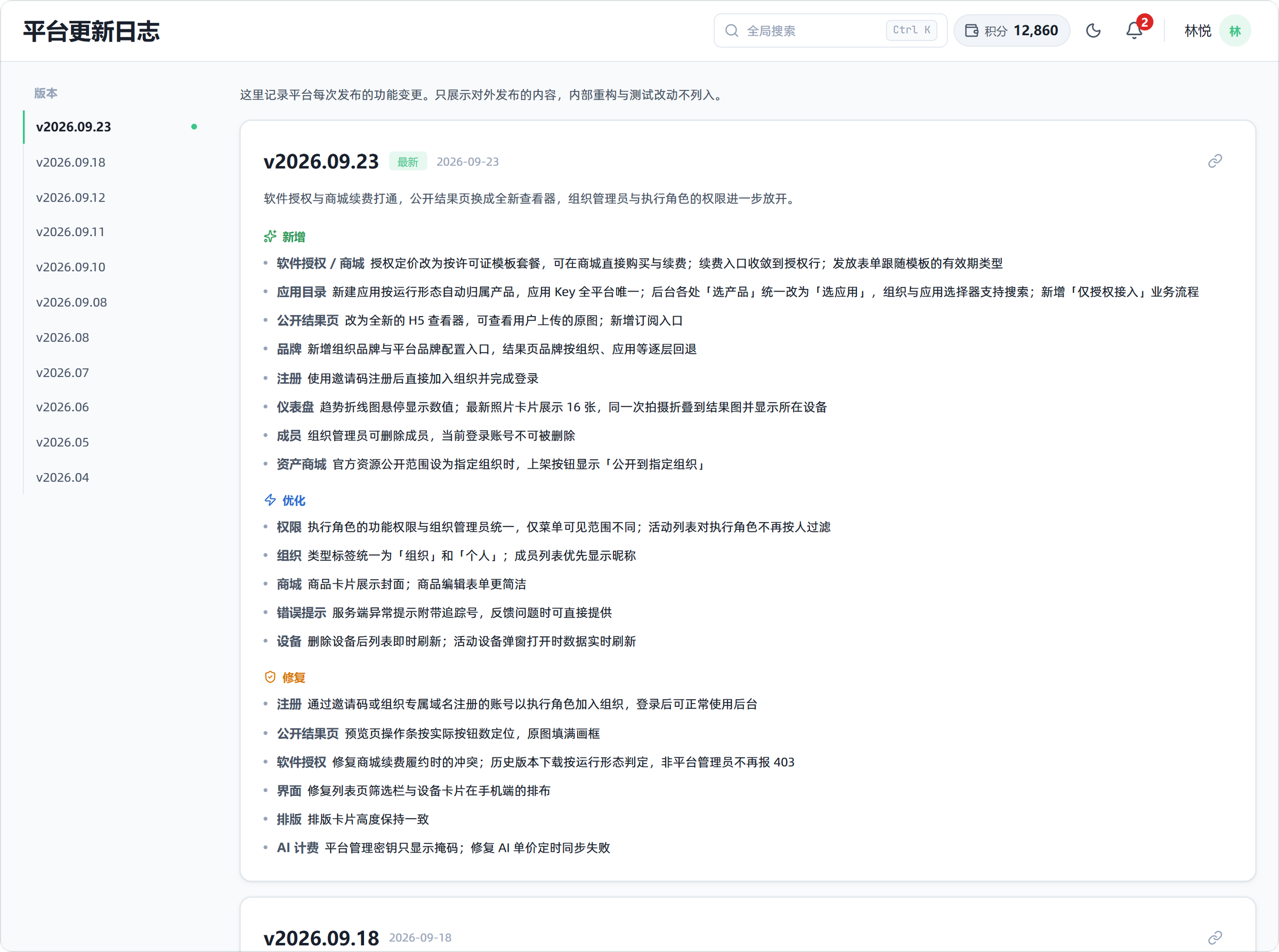
5. 每次更新都写在「平台更新日志」里5. Every release is written up in the platform changelog
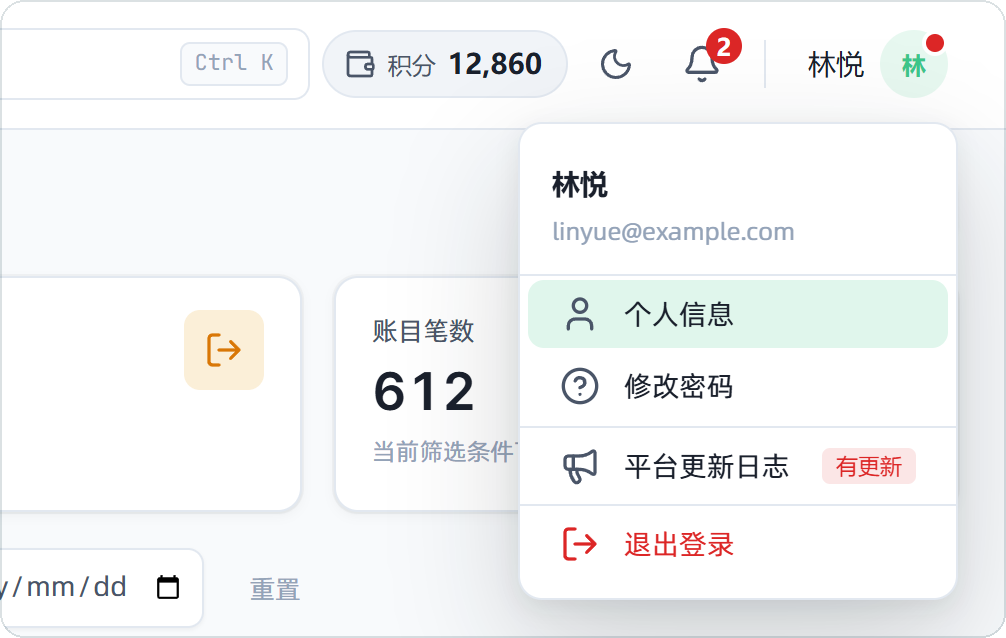
平台每次发布新版本,都会在「平台更新日志」里写清楚新增、优化和修复了什么。有新版本时,右上角头像会出现红点;打开头像菜单,「平台更新日志」旁边会标出「有更新」,点进去就能看到。Each release is described in the platform changelog — what was added, improved and fixed. When there is a new version, a red dot appears on your avatar in the top right; open the avatar menu and Platform changelog is marked as updated. Click it to read the notes.
怎么用上这些功能How to get these features
以上功能都已随 2026 年 9 月 23 日的版本(v2026.09.23)上线。登录 PepeFoto 管理后台就能使用;观众扫码打开的结果页也已经自动换成新版查看器。All of these features are live as of the September 23, 2026 release (v2026.09.23). Sign in to the PepeFoto admin console to use them; the result page your guests open by QR code has already switched to the new viewer.
关于截图:文中视频和截图使用的是演示数据。组织「星野活动策划」、活动、设备和各项数字都是虚构的,照片中的人物由 AI 生成;续费套餐和价格只用来展示界面,实际以购买中心显示为准。About the screenshots: the video and images use demo data. The organization Hoshino Events, its events, devices and numbers are fictional, and the people in the photos are AI-generated. Renewal plans and prices are shown only to illustrate the interface; actual pricing is shown in the purchase center.
想在你的现场做类似的互动?Want something like this at your event?